FAQ
My application isn't pre-integrated with HPCBOX
HPCBOX is a fully extensible platform and applications are made available continuously. In case you do not find your favorite application already pre-integrated into the platform, please contact HPCBOX Support at boxhelp[at]drizti.com, or use our Support Form. We are very eager to get more applications on-boarded to HPCBOX and look forward to your request.
How to disable your Screensaver
Follow these steps to disable the screensaver within your HPCBOX remote desktop.
Open screensaver settings
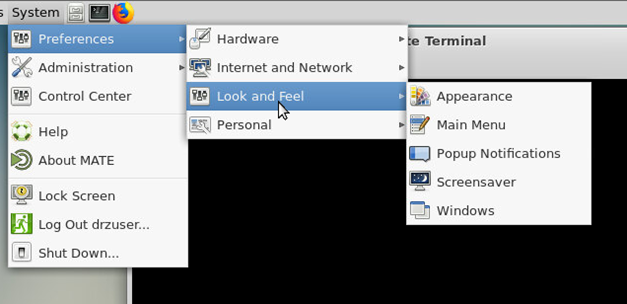
Uncheck screensaver options
How do I reset the remote desktop panel
If you are using the MATE Desktop manager, it sometimes needs a panel reset when it stops displaying the Start menu. To this, open a Mate Terminal from the task bar and run the command mate-panel --reset.
If you are unable to start mate-terminal using the task bar. Use ALT+F2 to launch a run window and type mate-panel --reset within it.
If you still have problems, try the following mate-panel --replace&
How do I report an error in the documentation
Please contact boxhelp[at]drizti.com for suggesting a correction in the documentation. Thank You.
Where do I go for further help
Please send a note to boxhelp[at]drizti.com or use our Support Page