HPCBOX AutoScaler
The HPCBOX AutoScaler can be used to automatically start/stop workers based on current jobs on the cluster.
The AutoScaler can be used in conjunction with Low-Priority spot-priced VM instances to reduce costs. Contact HPCBOX Support to assist with configuring spot-priced instances
The HPCBOX AutoScaler does not automatically add and delete nodes to the cluster, instead, it only operates by starting/stopping workers based on load. This is done to avoid situations when not enough quota is available for certain machine types within the cloud subscription and to reduce the time it takes to create and delete machines when auto-scaling.
Low priority/spot priced workers are only supported on Microsoft Azure at this time.s
This section describes the various configuration options which are available in the HPCBOX AutoScaler UI:
General Configuration
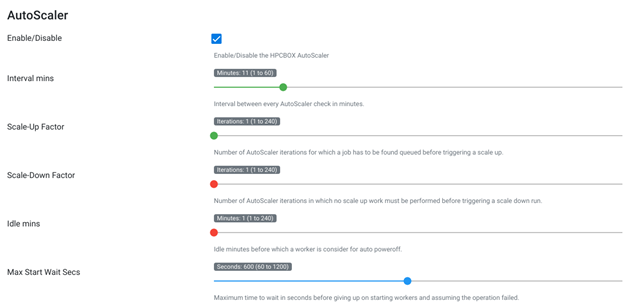
Enable/Disable: Enable or Disable AutoScaler functionality on the HPCBOX Cluster.
Interval Mins: The number of minutes between each AutoScaler iteration. This is the frequency at which the AutoScaler checks the cluster status and takes decisions on starting/stopping eligible workers. A setting of 1 is a good value for this option.
Scale-Up Factor: This setting tells the AutoScaler the number of iterations for which a job must be found to be in the queued state before trying to start workers to satisfy the job. Generally, a setting of 5 is a good option for this. Setting of 5 here and an interval of 1 min would mean that a job should remain queued for at least 5 mins before the AutoScaler decides to start new workers for it.
Scale-Down Factor: This setting tells the AutoScaler the number of iterations for which no scale-up operations must be performed before trying to scale down the cluster by shutting down idle workers. A value of 5 for this setting and an iteration interval of 1 min would mean that idle workers would not be considered for shutdown for at least 5 mins after the last scale up operation was performed.
Idle Mins: The number of minutes for which a worker must not have any job on it before it is considered for auto-shutdown. A value of 5 is a reasonable setting here.
Max Start Wait Secs: The number of seconds for which the AutoScaler should wait while attempting to start workers during a scale-up operation. This setting is useful especially when using spot-priced instances because sometimes the VMs will not get allocated due to unavailability of capacity in the data-center. A value of 300-600 is a reasonable value for this setting. Note that, this must be adjusted from experience and depends on the type of VM instances and the amount of time they take to boot up in an ideal condition.
Baseline Configuration
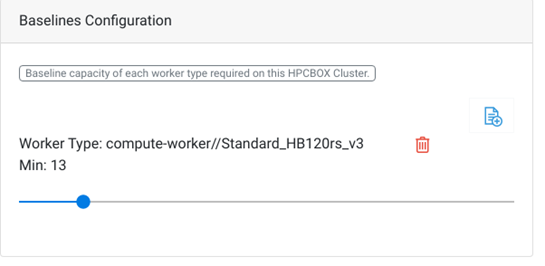
Baseline configuration allows us to set the minimum cluster capacity which must be always maintained. It is possible to set the number of workers per worker type which must be turned on and available for jobs. Note that, this only sets up the number of minimum workers, not number of free workers. Usually, this configuration is based on the number of Reserved/Pre-Paid VM instances which have been purchased for the subscription. The ➕ icon can be used to setup baseline values for different worker types. For example, in the screen shot above, compute-workers of type Standard_HB120rs_V3 are set to a baseline value of 13, meaning, at any time, the number of powered-on workers of this type on the cluster would be 13.
A baseline configuration with 0 must be set for any worker type which needs to be shut down by the AutoScaler after the configured idle time.
Scalers Configuration
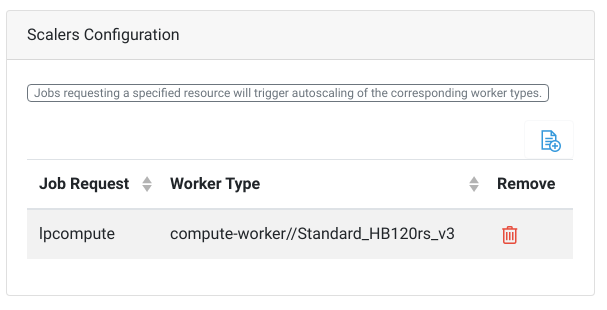
The Scalers configuration allows us to match job types with hardware types. Every job which is submitted through the HPCBOX platform can request a particular resource type and the AutoScaler can be set up to always consider VMs of a particular hardware type for satisfying jobs requesting a particular resource type. In the example above, the AutoScaler will only consider workers of type Standard_HB120rs_V3 to satisfy jobs which are submitted with a request for lpcompute. Generally, end users don’t really make any resource requests when submitting jobs, instead, the administrator or the support personnel have already configured applications of certain type to make a request for a certain resource type.