Inter-Step Data Passing
HPCBOX supports passing data between workflow steps using step environment files. This allows a step to export variables that downstream steps can read, enabling dynamic configuration across your pipeline.
Enabling Step Data Passing
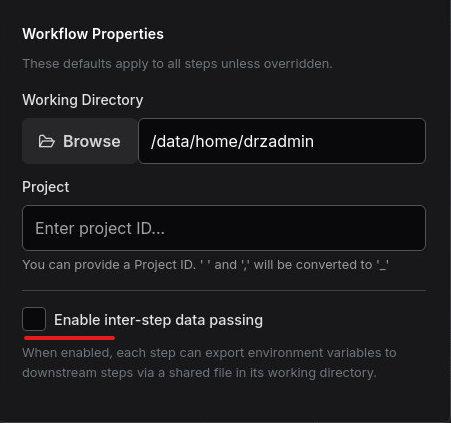
Step data passing is an opt-in feature. To enable it, open the Workflow Properties dialog by clicking the gear icon in the workflow editor toolbar and check the Enable Step Data Passing option.
How It Works
- A workflow step writes key-value pairs to a special file called
drz_step_env.<stepname>in its working directory. - After that step completes, the executor reads this file and injects the variables into the environment of all downstream steps.
- Downstream steps can then use these variables just like any other environment variable.
Step Env File Format
The file uses a simple KEY=value format, one variable per line. Lines starting with # are treated as comments and blank lines are ignored.
File name: drz_step_env.<stepname>
Location: The step's working directory (DRZ_WD)
# Example: drz_step_env.MeshGenerator
MESH_FILE=case/constant/polyMesh/mesh_fine.msh
MESH_ELEMENTS=245000
SOLVER_READY=true
Writing a Step Env File
In your application script, write variables to the env file using standard shell redirection. The step name is available as DRZ_STEP_NAME:
#!/bin/bash
# Step: MeshGenerator
# Generate the mesh and export its path for downstream steps

blockMesh
MESH_COUNT=$(grep -c "cells" log.blockMesh)

# Write variables for downstream steps
cat > "${DRZ_WD}/drz_step_env.${DRZ_STEP_NAME}" <<EOF
MESH_FILE=${DRZ_WD}/constant/polyMesh
MESH_ELEMENTS=${MESH_COUNT}
EOF
Reading Variables in Downstream Steps
Downstream steps don't need to do anything special. The executor automatically reads the env file and injects the variables before launching the next step. Your scripts can reference them directly:
#!/bin/bash
# Step: Solver (runs after MeshGenerator)
# MESH_FILE and MESH_ELEMENTS are automatically available

echo "Running solver on mesh: $MESH_FILE ($MESH_ELEMENTS elements)"
simpleFoam -case $MESH_FILE
Data Passing with Split/Join
When using parallel branches (Split/Join), environment variables from steps inside subshells do not automatically propagate to the parent shell. HPCBOX handles this by sourcing the env files from disk after all branches complete at the Join point.
This means:
- Each branch step writes its env file to its own working directory as normal.
- After the Join node, all branch env files are read and merged.
- Steps after the Join can access variables from all branches.
# Automatically generated after a join:
# Source env files from parallel branch steps
[ -f "$DRZ_WD/drz_step_env.BranchA" ] && source "$DRZ_WD/drz_step_env.BranchA"
[ -f "$DRZ_WD/drz_step_env.BranchB" ] && source "$DRZ_WD/drz_step_env.BranchB"
If two branches write the same variable name, the last one sourced wins. Branch env files are sourced in the order they appear in the workflow.
Data Passing with Loops
Inside a loop body, step env files work the same way. Each iteration can write to the env file, and the next step within that iteration will receive the variables. Note that each iteration overwrites the env file from the previous iteration (since the step name is the same).
If you need to accumulate results across loop iterations, consider appending to a separate results file (e.g., results.csv) rather than relying on the step env file, which is overwritten each iteration.
Environment Variable Reference
The following environment variables are automatically available to every workflow step:
Workflow-Level Variables
These are set from the Workflow Properties dialog and apply to all steps:
| Variable | Description | Set By |
|---|---|---|
DRZ_WD | Working directory for the step | Workflow Properties or step override |
DRZ_PROJECT | Project identifier | Workflow Properties |
Step-Level Variables
| Variable | Description | Set By |
|---|---|---|
DRZ_STEP_NAME | Name of the current step | Automatically set |
DRZ_SCRIPT | Path to the step's execution script | Application definition |
DRZ_APP | Path to the application directory | Application definition |
Loop Variables (only inside loop body)
| Variable | Description | Example |
|---|---|---|
DRZ_LOOP_NAME | User-defined loop name | MeshRefinement |
DRZ_LOOP_ITEM | Current iteration item | fine |
DRZ_LOOP_ITER | Zero-based iteration index | 0, 1, 2 |
DRZ_LOOP_TOTAL | Total number of items | 10 |
Environment Layering Order
When a step runs, environment variables are resolved in the following order (later layers override earlier ones):
- System environment — inherited from the process
- Workflow defaults —
DRZ_WDandDRZ_PROJECTfrom Workflow Properties - Predecessor env — variables from upstream step env files (if data passing is enabled)
- Loop env —
DRZ_LOOP_*variables (if inside a loop body) - Step options — application-specific settings configured in the step properties panel
This means a step's own options always take priority. If a step leaves a field empty, the workflow-level default is used as a fallback.