ConvergeCFD
converge, CONVERGE_Studio, tecplot_for_converge, post_convert etc are all supported on the HPCBOX platform.
Installation
Converge is installed under /opt/drz/apps/convergecfd/<version>. ConvergeCFD provides its own preconfigured module files and environment scripts for different MPI variants. Application and MPI settings are placed in a modulefile under /opt/drz/apps/convergecfd. This modulefile can be used to set the location of the vendor provided modulefiles directory. Intel MPI settings can be overridden on compute nodes by placing MPI related environment variables in /etc/hpcbox/impi_settings.sh.
A sample ConvergeCFD module file can be found below.
#%Module 1.0
#
# ConvergeCFD 3.1.4 module file
#


set  CONVERGECFD_HOME /opt/drz/apps/convergecfd/
set  CONVERGECFD_VERSION 3.1.4
set  CONVERGECFD_MODULEFILES_ROOT  $CONVERGECFD_HOME/$CONVERGECFD_VERSION/Convergent_Science/Environment/modulefiles/

setenv  CONVERGECFD_HOME    $CONVERGECFD_HOME
setenv  CONVERGECFD_VERSION $CONVERGECFD_VERSION

# Change the type of MPI you want to use here
setenv  CONVERGECFD_MPI_TYPE   CONVERGE-IntelMPI

#Load Tecplot  module files
module  load $CONVERGECFD_MODULEFILES_ROOT/tecplot_for_converge/2020.2.0

# Set environment for ConvergeStudio
prepend-path  PATH  $CONVERGECFD_HOME/$CONVERGECFD_VERSION/v3.1/bin/
prepend-path  LD_LIBRARY_PATH  $CONVERGECFD_HOME/$CONVERGECFD_VERSION/v3.1/lib64

# License server information. Change this for your environment
setenv  DRZ_CONVERGECFD_LICENSE_SERVER rlm_port@convergelic01

# Set Intel MPI configuration

setenv   DRZ_CONVERGECFD_IMPI_I_MPI_FABRICS  shm:ofi
setenv   DRZ_CONVERGECFD_IMPI_PATH  /opt/intel/oneapi/mpi/latest/bin
setenv   DRZ_CONVERGECFD_IMPI_FI_PROVIDER_PATH /opt/intel/oneapi/mpi/latest/libfabric/lib/prov
setenv   DRZ_CONVERGECFD_IMPI_LD_LIBRARY_PATH /opt/intel/oneapi/mpi/latest/lib
setenv   DRZ_CONVERGECFD_IMPI_INTEL_MPI_HOME /opt/intel/oneapi/mpi/latest
Workflow
Job and CPU Settings
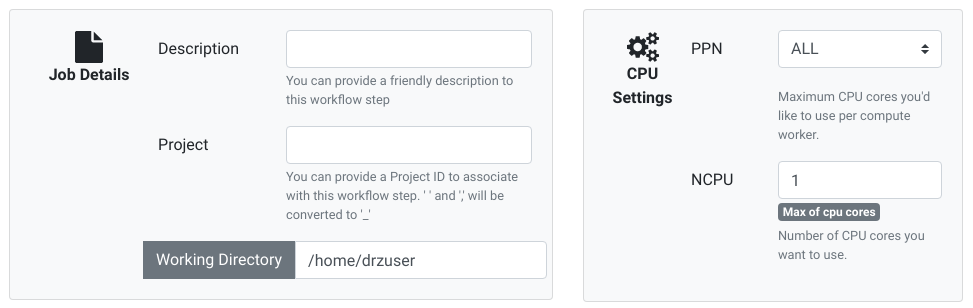
In this section, users can set various job related options like number of CPUs to use, spread of processes over distributed hosts and the number of CPUs to use for your run.
Application Options
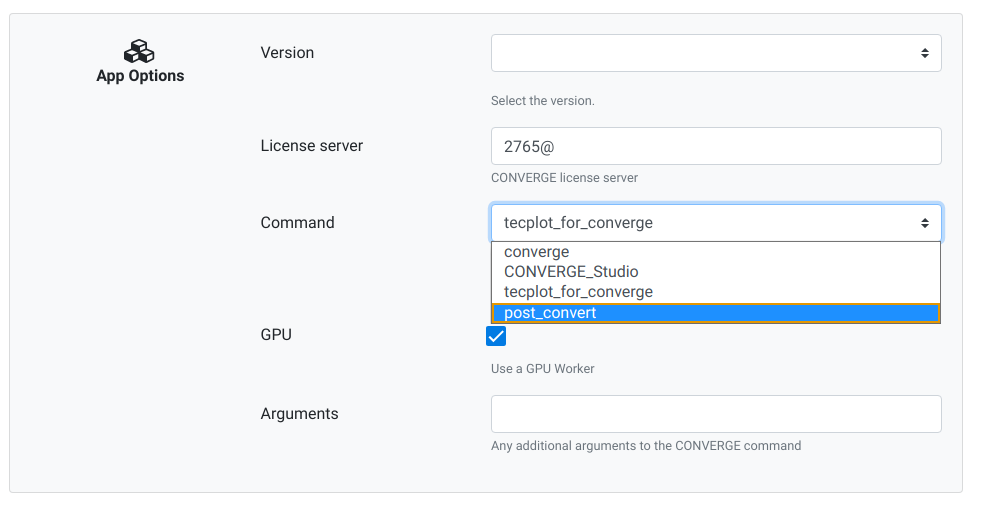
Version: Select the version of ConvergeCFD to execute
License Server: Provide details of your Converge License Server
Converge Command: Select the Converge command to execute.
The input file name and number of partitions for parallel commands are automatically passed to the command.
GPU: When selecting CONVERGE_Studio or tecplot_forconverge, you will be provided an option to use a GPU node for hardware accelerated 3D rendering when executing the application.
Arguments: Any additional options to the selected command can be provided in this field.